How to use the inventory scope picker
The inventory scope picker lets you define which inventories are searched by a particular feature. With no scopes defined, every inventory Allagan Tools knows about is searched. Each scope you add narrows that down to a specific character, world, or set of inventory categories.
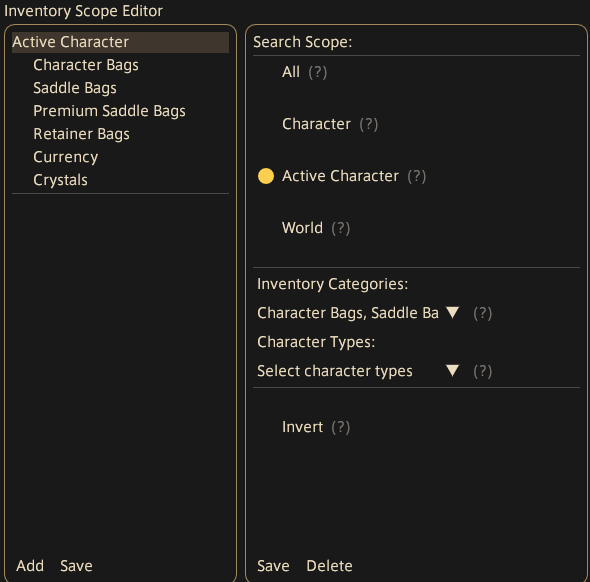
The scope list (left panel)
Lists all defined scopes. Each entry shows the scope name with its configured inventory categories and character types indented beneath it. Click a scope to select and edit it on the right.
- Add — creates a new blank scope and opens it for editing
- Save — closes the picker
Configuring a scope (right panel)
Search Scope
Mutually exclusive radio buttons that set what the scope targets:
| Option | Searches |
|---|---|
| All | Every inventory Allagan Tools knows about |
| Character | A specific character selected from a dropdown (grouped by type: player, retainer, free company, etc.) |
| Active Character | Whoever is currently logged in, including their retainers, free companies, etc. |
| World | All characters on a specific world, selected from a dropdown |
Inventory Categories
Multi-select dropdown. When set, only the chosen categories are included in the scope — leave it empty to include all categories. When Character mode is selected, the list is filtered to categories applicable to that character's type.
Character Types
Multi-select dropdown, available when Search Scope is All, Active Character, or World. Restricts the scope to only the chosen character types (e.g. Player, Retainer, Free Company). Not shown when targeting a specific character.
Invert
When checked, the scope matches the opposite of what is configured. The scope name gains an (Invert) suffix in the list. Useful for excluding a specific character or category from an otherwise broad search.
Save / Delete
Save confirms edits and deselects the scope. Delete removes the scope from the list entirely.