Equipment Recommendation
Equipment Recommendations
The Equipment Recommendations screen provides gear suggestions based on your selected filters, making it easier to optimize your character's equipment at any level and job.
Overview
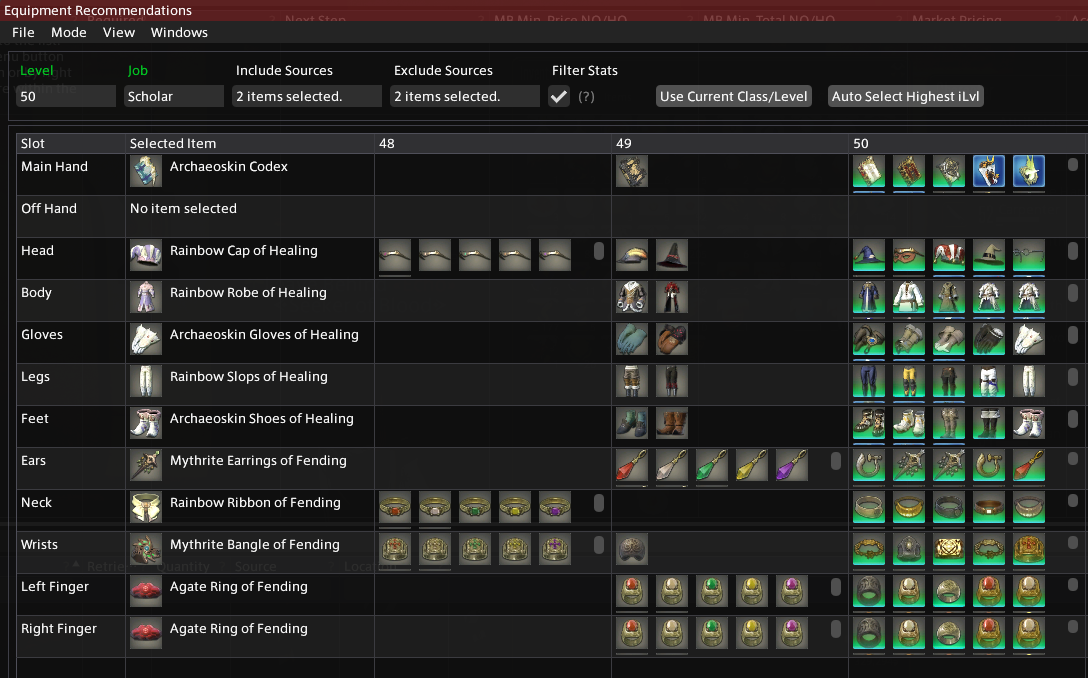
This tool allows you to select a level, job, and a range of filters to view and compare available equipment. The interface shows a list of recommended items for each gear slot, based on item level and optionally filtered stats. You can quickly switch between options and build an ideal gear set tailored to your needs.
Interface Breakdown
| Section | Description |
|---|---|
| Level / Job | Choose the character level and job to generate gear recommendations for. |
| Include Sources | Select which item sources are allowed in recommendations (e.g., marketboard, shops, duty drops). |
| Exclude Sources | Select item sources to exclude from recommendations. |
| Filter Stats | When enabled, items will be filtered to only show those with relevant stats for the selected class. For example, crafting classes will only see gear with crafting stats. |
| Use Current Class/Level | Automatically sets the level and job fields to match your current character. |
| Auto Select Highest iLvl | Automatically selects the highest item level equipment for each slot from the available recommendations. |
Item Table
The central table is divided into columns:
- Slot: Equipment slot (e.g., Main Hand, Head, Body).
- Selected Item: The currently selected item for that slot.
- Level Columns (48, 49, 50, etc.): Available gear for the selected job at that item level.
Interactions
- Left Click an Icon: Selects or unselects the item for that slot. The selected item will be highlighted and shown in the "Selected Item" column.
- Right Click an Icon: Opens the standard Allagan Tools context menu for that item, allowing you to view details, market listings, and other actions.
Notes
- You can freely mix and match gear across item levels to build a custom set.
- The interface supports comparing visual appearances, item level, and stat combinations.
- Right-click context menus behave identically to other parts of the Allagan Tools ecosystem, enabling advanced inspection and quick navigation.